Contents
- Index
Help Menu - How to Use
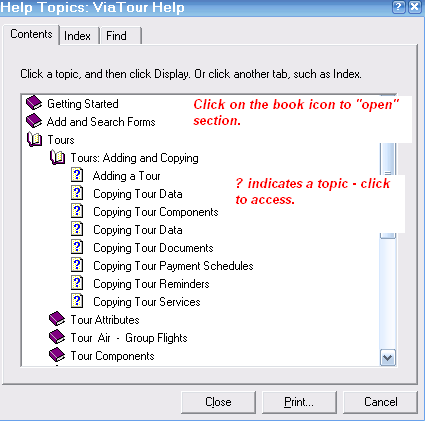
The Help Menu is divided into Topics.
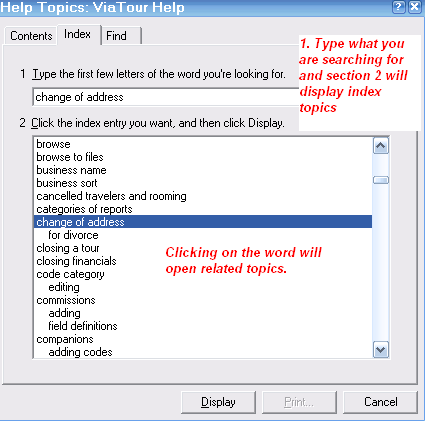
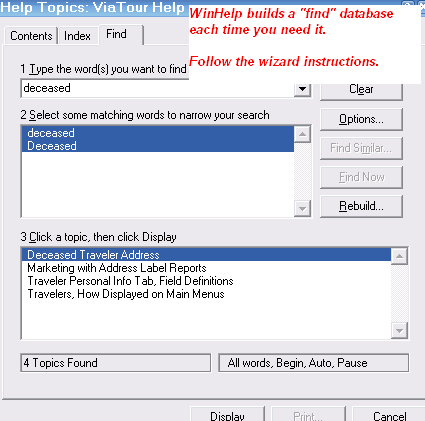
You can search for a Topic under the Contents (Table of Contents), Index or Find (a word search feature, just follow the wizard instructions).
NOTE: CLICK ABOVE TO ACCESS:
Contents, Index & Find HELP features
THESE ARE SCREENSHOTS:
Contents
Index
Find
Many topics have green links to additional information (click on the link to access) and at the end of many topics you will find a list of Related Topics where you can learn more about an area of ViaTour.
After viewing a topic you can click BACK to return to a previous topic.
You can also print topics (File - Print)
Feedback
Suggestions for improving the help menu are always welcome. Send to: info@viatoursoftware.com