Contents
- Index
Custom Fields, Creating in Code Table
ViaTour allows users to create custom fields to track values not available in ViaTour.
The codes can be added or edited in system maintenance in the view/edit look up codes form.
Naming of code field:
ResCustomField = Reservation custom data
TourCustomField = Tour custom data
TravCustomField = Traveler custom data
VendorCustomField = Vendor custom data
To add a "Custom Field" see Adding Look up codes in System Maintenance.
Example using Traveler Custom Data:
1. Click on System Maintenance
2. Click on View/Edit Look up Codes
3. In the yellow box at the top of the view/edit look up codes form select TravCustomField. Add your new value under code.
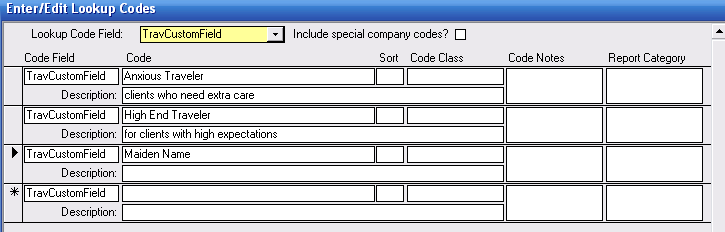
4. Whatever code you enter in the code table for TravCustomField is available on the Traveler Form - Custom tab to assign to a Traveler.
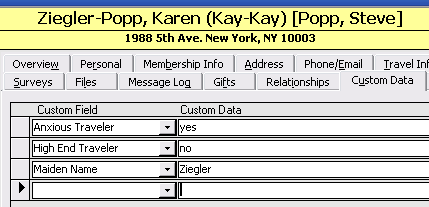
5. You will notice there is also a data field on the Traveler Form - Custom tab that can hold additional information. Unlike the code list, which is controlled, users can add any data here.
Note:
Garbage in/garbage out: the data value field on the Traveler form is text, but if you are using it to store a date, you must enter the data in a consistent format for it to be treated as a date in custom reports. It is not possible to have a "mask" in place (for date , for example) because all clients use custom fields differently.
Custom data and search: you can search by custom fields as well on the "Search Travelers" form.
Field size: limit is 255 characters