Contents
- Index
Room Groupings
When you enter a new reservation the Room Grouping field automatically displays the traveler's name. If the traveler is taking single accommodation you need not do anything more (except add room details, see step 3 below.). For travelers sharing a room, you will assign one traveler as another's Room Grouping by following these steps:
1. Add the reservation for the first traveler.
2. Add reservation for the second traveler, then, in the Room Grouping box, click the drop-down arrow. Select the first traveler from the list with a click. ViaTour adds the person to the room.
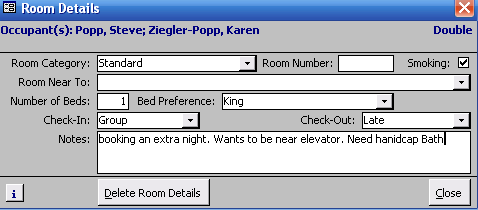
3. Now click on the Room Details button: both travelers will be listed. Add any room details to the room record, such as room category, bed preference and number of beds, adjoining others rooms, notes, etc.
Related Topics
Creating Room Groupings for 3 or more Travelers
Removing a Traveler from a Room Grouping
Room Groupings and Cancelled Travelers