Contents
- Index
Companion Tracking on a Tour
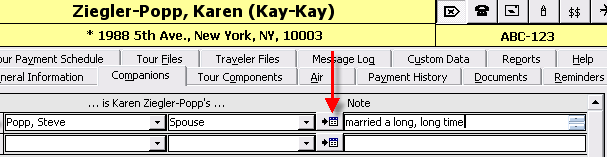
On the Reservations Form - Companions Tab you can link travelers on the tour who share a relationship.
1. Select the Traveler.
2. Select the relationship
3. Add a note if applicable.

4. Buttons at the bottom of the form allow you to pull in Relationships from the Traveler Record to the reservation record, or Push the newly created relationship to the traveler records.

Note: When you add new reservations, any existing traveler relationships will automatically appear on the Reservation Companion tab.
However, if you add a relationship on the Reservation, it will not automatically be displayed on the Travelers relationship Tab, until you click the button "Send To Traveler Relationship."
Likewise, if a Relationship has been added on the Traveler record after reservations are created, they will not appear with the reservation until you "pull" them to the Reservation Companions tab by clicking on the "Get Traveler Relationships Button."
Why does ViaTour manage it this way? In some cases relationships may only be important on the Reservation level. "Forced "Share" is one example, when two singles are sharing accommodations, but they are essentially strangers. You do not need this information dragged around from year to year with the Traveler record.
5. This is a short cut button that will take you to the other traveler's Reservation record.
Related Topics
Adding relationships in Code Table