Contents
- Index
Financial Tracking in ViaTour
Transactions make up the financial reporting in ViaTour.
Every Transaction is linked to a Tour* and then either to a Vendor or a Traveler.
Note:*If you would like to track "General Operations" create that as a tour, with start date as the first day of your Fiscal Year and end date as the last end date. You can now assign transactions to "General Operations."
Our preset Financial Reports give you useful views of transactions by tour:
There are also generic transaction reports that allow you to filter based on attributes of a transaction such as media (Cash/Check/Credit card), Type (Deposit, Vendor Payment), Transaction Date range and so on.
A Transaction (Tx) has these attributes:
Tx DATE: the date you want associated with the transaction. Note: in Pro you can "dent allow or prohibit change or deletion to past transactions.
Tx TYPE: describes transaction, sometimes have specific use, for example Deposit Transactions for travelers are used in confirmation reports. On the vendor side users might want to be generic "Vendor payment" and "Vendor refund"or very specific, "Commission."
Tx ACCOUNT CODE: this is the detail such as "printing" and "tour income."
Tx AMOUNT: Amount paid to/received from a vendor or traveler. Refunds to Travelers are entered as a "negative" against income. Credits from vendors are entered as a negative against an expense. (You pay $100 to a hotel, but get a credit of $80, the $80 is entered as a negative (-$80) against the positive expense.)
Tx MEDIA DETAIL: you can store a check number or credit card info here. We have a query users can run 1x a day, 1x a week or 1x a month to clear out credit card transactions. Note: You may use a special update query to clear out credit card numbers stored in the media detail. The query can clear out transactions 1 day, 1 week or two weeks old on any transaction where media= Visa, Master Card, Am ex, Discover or Credit Card.
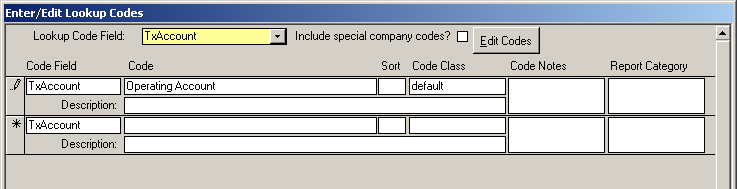
Tx ACCOUNT: this allows users to track income and expense through multiple accounts. If you onl;y have one "operating Account" you can have this auto-populate on all tours by adding the word default under code class in View edit Codes in system miantenance. It will look like this:
Tx EXPLANATION: for notes that are valuable historically. If you create a transaction from a service, this field is populated for you.
Tx RECEIVABLE Y/N? & FROM VENDOR: Mark as "yes" if you are paying for something that you expect reimbursement for and check select the VENDORNAME from the list.
Note: If you do not want to use transactions to generate a profit and loss, you can use the Tour Net Profit field to store an amount that is generated from an accounting system outside of ViaTour.
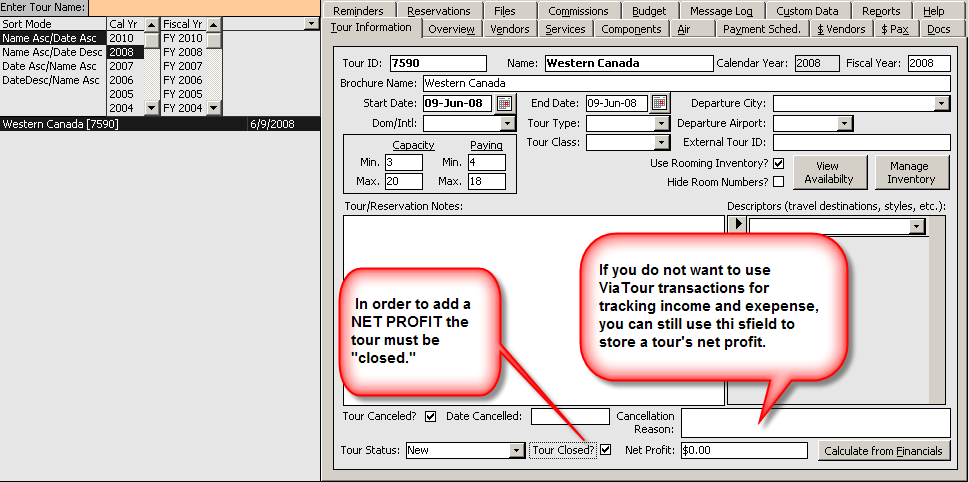
To see this non-calculated net profit run the Financial report called:
Tour Net Profit (from Net Profit Field) which shows: Tour Id, Tour name, Start and End date, if tour was Cancelled, if Finances have closed, and the tour "net profit" to date from the "Net Profit" field on the Tour Info form (e.g. not based on "live" transactions)