Contents
- Index
Assigning an Address to a Reservation
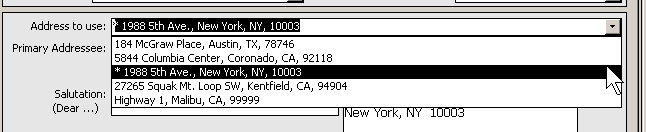
As you tab through the Reservation Form, the address for the reservation (which will be used for tour mailings) defaults to the Traveler's Primary Address (set on the Traveler form).
An asterisk (*) indicates that the address is the traveler's primary address.
If you wish to use a different address from the traveler's address record, select it from the drop down list by clicking on the arrow, or by typing the address in.
If the address you wish to use has not been entered in ViaTour, follow the steps for Adding a New Address for a Traveler first, then come back to the reservation form to select it from list of available addresses.
Note: User may edit the salutation, primary addresses and format address field on the reservation itself. This way, if only one member of a mailing address is traveling, the tour mailings can be modified to go to one person.
Note: To fix typos on an existing address, or to make changes that you wish to have appear on all instances of this address, click on the envelope icon next to the format address. This takes you to the Address form. Correct the typos in the appropriate field (address1, address 2, city, state, zip) and then click the Format button. The Format button will pull the corrected info into the address label that is used in reports for traveler addresses. You can use the tab "reservations using this address" to update reservation address information.